OkoIntelligence
Menu
  1. 01

    Tell us what to search

    Confirm your email, and add your phone and any search hints, like past names or usernames.

  2. 02

    Get your free check

    See how many people-search sites, breaches and accounts are tied to your email.

  3. 03

    Read your full report

    Every listing, what it shows, how a stranger gets from one to the next.

  4. 04

    Work through the fixes

    Use each site's opt-out link and mark each fix done.

  5. 05

    Recheck regularly

    Listings come back. A recheck shows what's new, gone or back.

A few minutes to get started

Confirm your email, and add your phone number too if you like.

Have an old username, a maiden name or a past city? Add it as a search hint. It’s optional, and it can only help: it lets us tell which results really belong to you, so your report stays accurate.

Invited by your organization? Your report is already paid for, so you skip the free check and go straight to your full report.
See how exposed you are, free

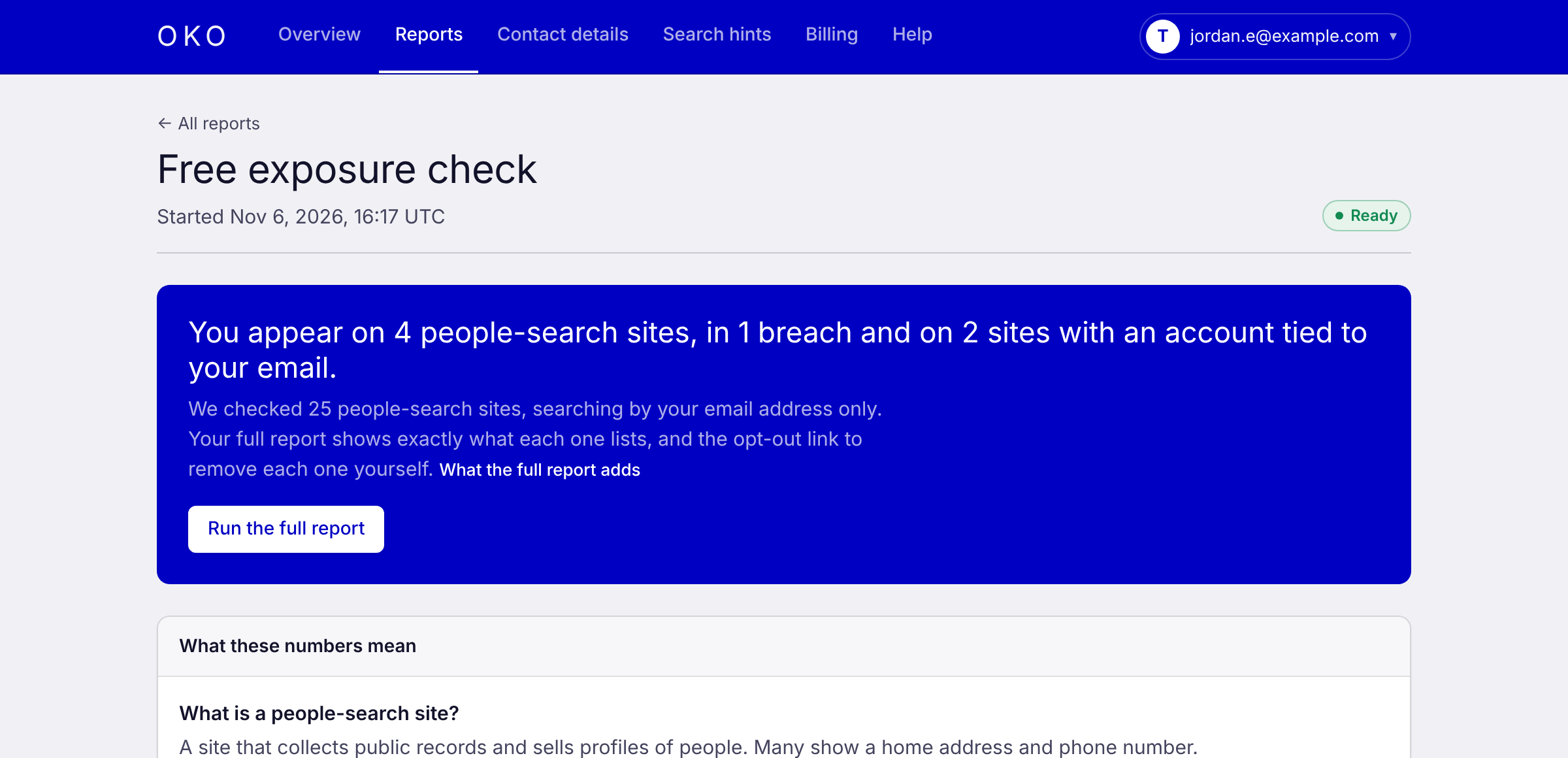
In a few minutes, the free check gives you a first look at how exposed you are across people-search sites, data breaches and online accounts. No card needed.

Free checkExample data
A free exposure check: the number of people-search sites, breaches and accounts tied to the email, with a button to run the full report.

Your full report goes further. Oko starts from your details and follows the trail a determined stranger would: an email to an old account, the account to a username, the username to a listing with your address. Here’s where we look:

People-search sites

We check the largest people-search sites and show you exactly what each one lists about you.

Old and forgotten accounts

Find the sites where your email still has an account, including ones you signed up for years ago.

Data breaches

Learn which breaches your email is in and what was exposed, so you know which passwords and numbers to change.

Usernames

See where your usernames are in use and what those profiles give away about you.

Search results

Spot the pages that show up when someone searches for your details.

Everything in one clear report

A full report usually takes under an hour. We email you when it’s ready.

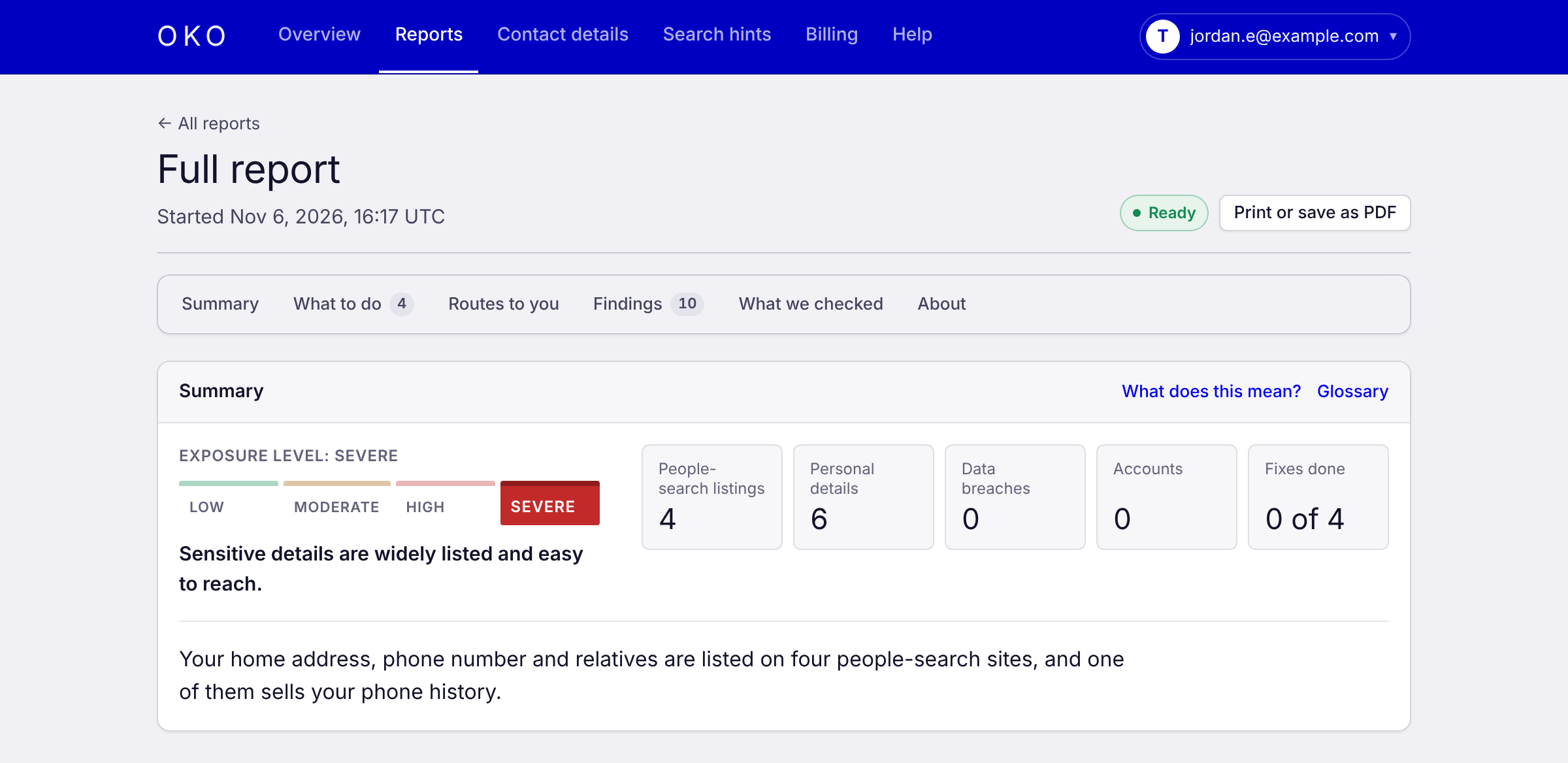
  • Your exposure level, with a plain summary of what it means.
  • Routes to your details: each way someone could get from your name or email to your address or phone, step by step.
  • Every result with where we found it, when, how sure we are it’s you, and a screenshot.
  • A ranked fix list with a direct opt-out link for each listing and what to change on each account.

If something points to real danger, like a post asking where you live, the report opens with what to do first. See pricing.

Exposure reportExample data
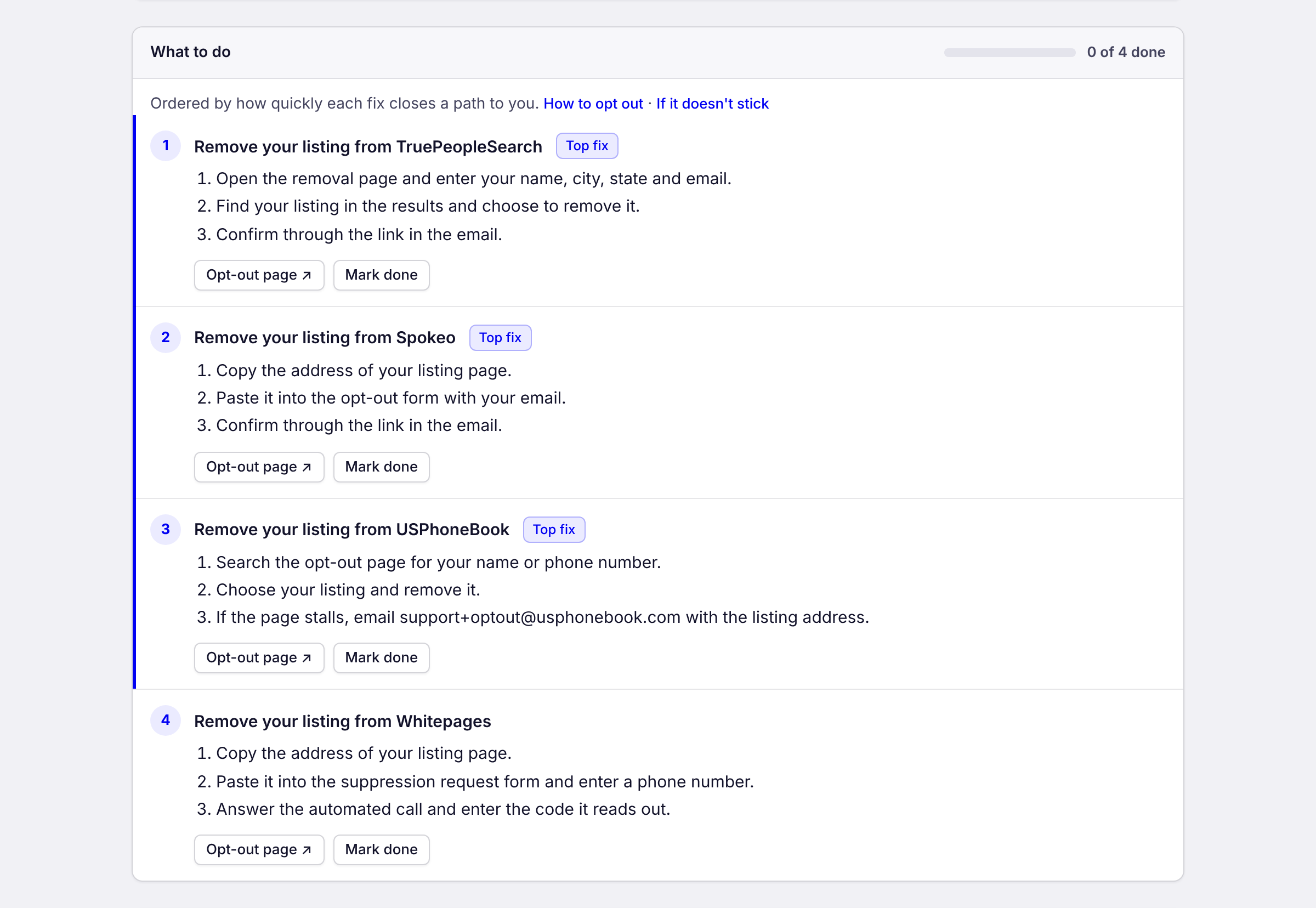
The top of a full report: an exposure level of severe, counts of people-search listings, personal details, breaches, accounts and fixes done, and a one-line summary.The report’s “What to do” list: numbered steps to remove each listing, each with a link to the site’s opt-out page and a Mark done button.
Every result comes with its source, a screenshot and the date it was found

See the full sample report

Know what each result means

Every result explains itself: what it means for you, and the fastest way to deal with it.

People-search listing

Your home address is listed

What it means

Anyone who types your name into this site can see where you live, often with your age and relatives.

What you do

Your report links straight to the site’s opt-out page and walks you through it in a few steps.

Phone number

Your personal number is public

What it means

Your mobile shows up next to your name, which makes it easy to call, text or look you up further.

What you do

We show every site listing it, ranked by which to opt out of first.

Old account

A forgotten account points to you

What it means

An account you opened years ago still shows a username or city that links back to your real identity.

What you do

Close it, or change the details on the profile. We tell you which.

Data breach

Your email was in a breach

What it means

A company you used lost data that included your email, and sometimes your password or phone number.

What you do

You see which breaches and what was exposed, so you know exactly what to change.

Paywalled detail

Your address is a few dollars away

What it means

The free page hides it, but anyone willing to pay a small fee can unlock your current address.

What you do

We flag it so you can opt out before someone pays to look.

Recheck

A listing came back

What it means

People-search sites often re-list you months after you opt out.

What you do

Your recheck leads with what’s new, what returned and what’s gone, so you only fix what changed.

Start at the top of the list

“What to do” puts your fixes in order: the ones that close the quickest routes to your private details come first.

Each fix has a direct link to the site’s opt-out page and plain steps. On the yearly plan, Oko sends the requests for you and shows you where each one stands. The few sites that need a phone call or your ID stay on your list, with the steps.

Mark each fix done as you go. Your progress is saved, so you can come back to the rest another day.

We do

  • Find your listings, old accounts and breaches.
  • Explain what each one shows and how a stranger gets from one to the next.
  • Put the fixes in order, quickest route to your private details first.
  • Send the opt-out requests for you on the yearly plan.
  • Recheck when it’s due and show you what changed.

You do

  • Handle the few sites that need a phone call or your ID, with the steps in your report.
  • Close or change the old accounts we point to.
  • Mark each fix done, so you can see what’s left.
  • Run a recheck when we remind you.

Rechecks show what changed

People-search sites re-list you, and new ones pop up. We email you when a recheck is due. It runs your last report again and leads with what changed: new listings, ones that came back, and ones that are gone. You only fix what’s new.

On the yearly plan, Oko also keeps checking between rechecks and sends the request again if a listing comes back.

Common Questions

How long does it take?

The free check takes a few minutes. A full report usually takes under an hour. We email you when it’s ready.

What does my organization see?

A short summary of your report: your exposure level, which people-search sites list you, how many other sources we found you in, how many ways a stranger could reach your home, family, phone or routine, and how many fixes you’ve done. Never your details, the findings or your report itself. Once enough people have finished, your organization also sees totals across the team.

What is a credit?

One credit pays for one full report or one recheck. If a report fails, you get your credit back. Credits last two years from purchase. Buying credits never starts a subscription.

What’s a recheck?

A recheck runs your last report again and shows what’s new, what’s gone and what came back. We remind you when it’s time for one.

Do you contact the sites for me?

On the yearly plan, yes. Oko sends the opt-out requests for you, and your report gives you the steps for the few sites that need a phone call or ID. With a single report, you send each request yourself from the links in your report. Either way, each site decides whether to take your listing down.

Is the free check really free?

Yes. Everyone gets a free check, and you don’t need a card.

How is my information protected?

Your contact details, findings and reports are encrypted with a key that belongs to your account. Only you can read your report, after you sign in. We never put findings in email. We collect what it takes to find your listings and send the requests, and nothing more. No ads, no tracking, and we don’t sell your information. Delete a report, or your whole account, whenever you like. The privacy policy has the details.

More answers in the help center

See What a
Stranger Sees

Request access